
Translator with Speech HD Pro3.30 - App Store
You'll be able to see results in few seconds.
Publisher Description
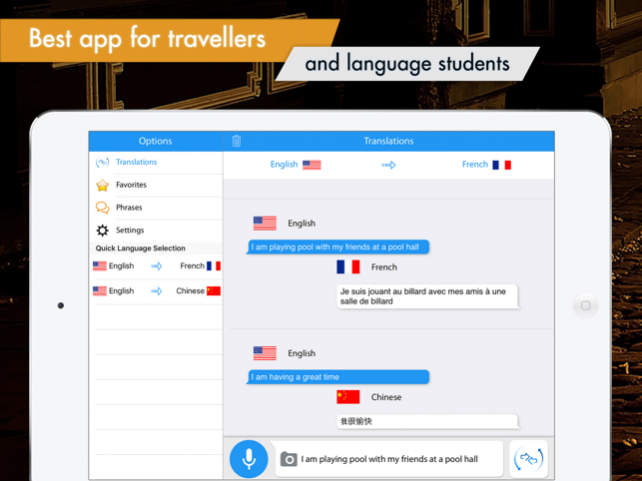

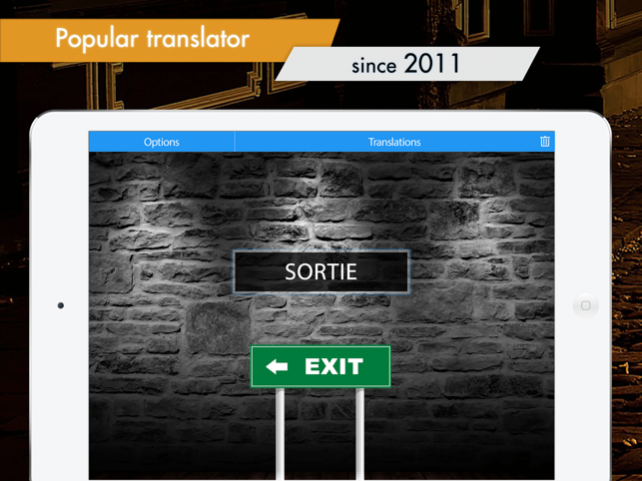
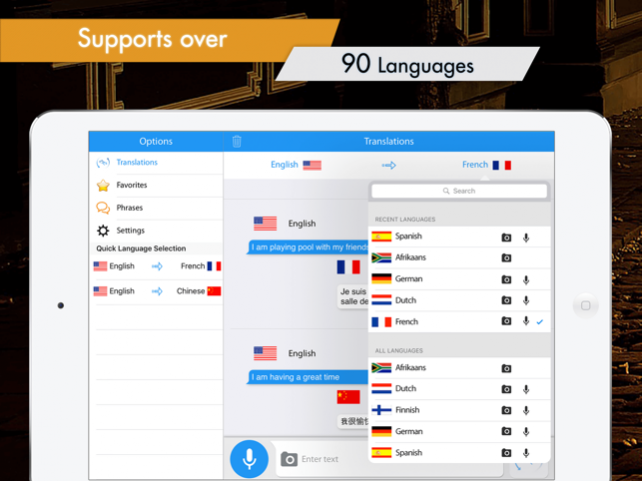

The coolest translator on the iPad now supports speech input for the following languages:
Czech
Dutch
English
Finnish
French
German
Hungarian
Italian
Japanese
Korean
Polish
Portuguese
Russian
Spanish
Swedish
Turkish
NEW: photo feature. Take a photo of any text in any language, and translate it!
Check our video: http://youtube/R5wnmvkPF4o
Use this talking translator to instantly translate any text into any of 54 languages! It also pronounces the translation for you.
Unlike other translation apps, this one does not solely depend on one web translator. It produces superior spoken translations!
This translator also stores previous translations in its database and allows you to prepare a set of translations in advance and play them back later without the need for internet and expensive data roaming.
This application features:
-Translation into any of 88 languages
-Allows for English language speech input
-Remembers earlier translations, providing playback without internet
-Just click to playback; very useful when trying to tell that taxi driver where you want to go
-Increase the font size
-Localization for 10 major languages
-Transliteration support for non-latin character sets
-Sleek user interface
-Send your translations to Twitter, Facebook or Email
-Inbuilt common phrases for major languages
-Voice support! Supports voice recognition for English
Supported languages:
-Afrikaans
-Albanian
-Arabic
-Armenian
-Azerbaijani
-Basque
-Belarusian
-Bengali
-Bosnian
-Bulgarian
-Catalan
-Cebuano
-Chichewa
-Chinese
-Croatian
-Czech
-Danish
-Dutch
-English
-Esperanto
-Estonian
-Filipino
-Finnish
-French
-Galician
-Georgian
-German
-Greek
-Gujarati
-Haitian Creole
-Hausa
-Hebrew
-Hindi
-Hmong
-Hungarian
-Icelandic
-Igbo
-Indonesian
-Irish
-Italian
-Japanese
-Javanese
-Kannada
-Kazakh
-Korean
-Lao
-Latin
-Latvian
-Lithuanian
-Macedonian
-Malagasy
-Malay
-Malayalam
-Maltese
-Maori
-Marathi
-Mongolian
-Nepali
-Norwegian
-Persian
-Polish
-Portuguese
-Punjabi
-Romanian
-Russian
-Serbian
-Sesotho
-Sinhala
-Slovak
-Slovenian
-Somali
-Spanish
-Sundanese
-Swahili
-Swedish
-Tajik
-Tamil
-Telugu
-Thai
-Turkish
-Ukrainian
-Urdu
-Uzbek
-Vietnamese
-Welsh
-Yiddish
-Yoruba
-Zulu
Speech translation is provided for the following languages:
- Afrikaans
- Arabic
- Albanian
- Catalan
- Chinese Simplified
- Chinese Traditional
- Croatian
- Czech
- Danish
- Dutch
- English
- Finnish
- French
- German
- Greek
- Hindi
- Hungarian
- Icelandic
- Indonesian
- Italian
- Japanese
- Korean
- Latvian
- Norwegian
- Macedonian
- Polish
- Portugese
- Romanian
- Russian
- Serbian
- Slovak
- Spanish
- Swahili
- Swedish
- Turkish
- Vietnamese
- Welsh
This application requires access to the internet to create a new translation.
Aug 16, 2017 Version 3.30
* Major overhaul of the user interface: Translator with Speech never looked this good!
* Additional features: quick language selection,recent language listing.
* Improved translation engine, using the best language sources available.
About Translator with Speech HD Pro
The company that develops Translator with Speech HD Pro is Sparkling Apps. The latest version released by its developer is 3.30.
To install Translator with Speech HD Pro on your iOS device, just click the green Continue To App button above to start the installation process. The app is listed on our website since 2017-08-16 and was downloaded 0 times. We have already checked if the download link is safe, however for your own protection we recommend that you scan the downloaded app with your antivirus. Your antivirus may detect the Translator with Speech HD Pro as malware if the download link is broken.
How to install Translator with Speech HD Pro on your iOS device:
- Click on the Continue To App button on our website. This will redirect you to the App Store.
- Once the Translator with Speech HD Pro is shown in the iTunes listing of your iOS device, you can start its download and installation. Tap on the GET button to the right of the app to start downloading it.
- If you are not logged-in the iOS appstore app, you'll be prompted for your your Apple ID and/or password.
- After Translator with Speech HD Pro is downloaded, you'll see an INSTALL button to the right. Tap on it to start the actual installation of the iOS app.
- Once installation is finished you can tap on the OPEN button to start it. Its icon will also be added to your device home screen.
Program Details
System requirements
Download information
Pricing
Version History
version 3.30
posted on 2017-08-16
Aug 16, 2017 Version 3.30
* Major overhaul of the user interface: Translator with Speech never looked this good!
* Additional features: quick language selection,recent language listing.
* Improved translation engine, using the best language sources available.
version 3.16
posted on 2011-11-01
Disclaimer
Official App Store Link
We do not host Translator with Speech HD Pro on our servers. We did not scan it for viruses, adware, spyware or other type of malware. This app is hosted by Apple and passed their terms and conditions to be listed there. We recommend caution when installing it.
The App Store link for Translator with Speech HD Pro is provided to you by apps112.com without any warranties, representations or guarantees of any kind, so access it at your own risk.
If you have questions regarding this particular app contact the publisher directly. For questions about the functionalities of apps112.com contact us.
